I created this file folder flip book (think mini scrapbook) from a plain ‘ole manilla file folder. Of course I had to add a pretty pink flamingo because flamingos make everything better, right!
A black and white stripe belly band adds a splash of unexpected contrast and holds everything in place.
There is so much real estate inside this little gem
Open it up up and voila – more flips and flaps and fun little places to tuck ephemera, photos and journaling.
I love layers and layers of color, texture and “happy”
Another Flip and you’ll find a fun place to tuck a personal letter, photo or handwritten journaling.
One more turn and flip and there you have it. A “FLIP BOOK”. Try one! They are a great way to use up all of that pretty stuff you’ve been hoarding! :0)
Want a closer look? Check out this video walkthrough:
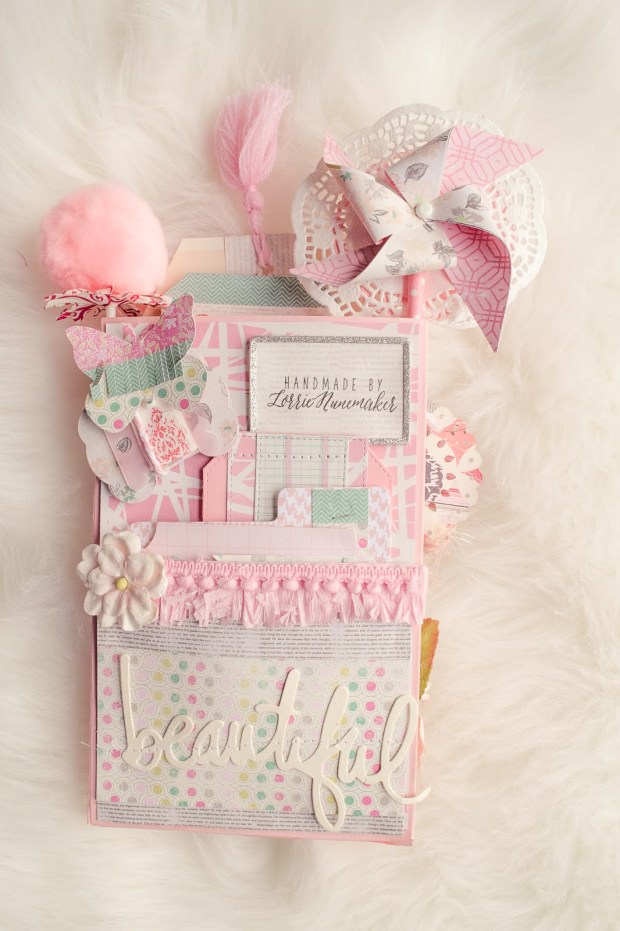
Have you tried a loaded envelope? I made this particular one months ago. I was looking through some photos on my computer and saw it and remembered just how fun these are.
You have unlimited room for creativity with a loaded envelope. It is literally just a shell filled with crafty yumminess
The more stuffed (or loaded) the better. I love to add all different kinds of textures and layers. It’s hard to stop. Even when you complete the front, there is a whole other side to this gorgeousness. Flip it over and …
enjoy more layers, more tags, more fringe, more PINK. Can you tell that’s my color yet?
I love making all of the “stuffers” almost as much as I love making the actual pocket.
So, what’s the purpose of these little beauties? My crafty friends and I make them and send them to each other for inspiration and to share our crazy love of paper pretties. It’s called swapping. You can take them apart and reuse/recycle the things inside, or you can keep it just like it is and display it as a paper decoration. There’s really no right or wrong.
They are just fun to look at!
Want to see more? Stay tuned! I have several others I hope to add to the blog soon.
I am. I am in love with a Machine. Not, just any machine. It’s the Cricut Maker! I know what you’re thinking… it’s ok. The Mr. Knows all about the Maker. He actually thinks it’s a pretty amazing too!
I mean how can you not love this state of the art handsome boy? Not only is this machine incredibly good looking, but it also features the revolutionary new adaptive cutting system. It features 10x more power than any of its Cricut Predecessors.
Do you see that pretty gold blade? That, my friends, is a ROTARY blade! It can do amazing things like cut raw fabric! You heard me, right. It can cut fabric without any kind of bonding or interfacing. You just load your fabric on the fabric mat (included in the box) and go. The Cricut will go about it’s merry way cutting and whizzing along the pattern lines. In just a few moments, your pattern is cut perfectly.
A little disclaimer, I never sewed with fabric until I got the Maker in October of 2017. So, ifI can do it, so can you! Just look at what I’ve been able to do with the help of this crazy, inspirational machine.
I created this pattern in Design Space (the free software to use with the Cricut Explore and Maker machines). I then added the fabric to the mat and let the Cricut Maker do it’s thing. You can watch the full tutorial here.
Once I got the hang of zippers, I decided to expand my sewing capabilities a bit and created another project/pattern in Design Space. I created this boxed pouch. It was a huge hit with my friends and family. It’s the perfect size for travel and holds most of your personal essentials. If you’d like to get the pattern and try one of these, you can watch the tutorial here.
So, those are just two of my very beginner sewing projects with the Cricut Maker. I just can’t say enough about this amazing machine! I’ve not even scratched the surface of what this machine can do. It can cut Vinyl, Iron On, leather, faux leather, basswood, Paper, Cardstock, Chipboard, and so many more materials. I cannot wait to share more fun projects with you.
Disclaimer: Links above are affiliate links. All opinions, reviews and tutorials are my own. I do not work for Cricut. I just love their products 😉




 I know what you’re thinking… it’s ok. The Mr. Knows all about the
  It features 10x more power than any of its Cricut Predecessors.


 It was a huge hit with my friends and family. It’s the perfect size for travel and holds most of your personal essentials. If you’d like to get the pattern and try one of these, you can watch the tutorial here.