How to Engrave Arcacia Cutting Boards w/the GlowForge

I am excited to share my very first tutorial with the GlowForge. Several of you have been asking me to share more about the GlowForge and I decided today is the day. Let’s talk GlowForge.

The GlowForge is a laser cutting machine. It is available in 3 different models. The Basic (which is the machine I have), the Plus (basically the same as the basic, but slightly faster) and the Pro. The Pro is their most advanced machine, which is not only faster, but also allows one to cut items any length (restricted to 17″ wide). Keep in mind, the Plus actually uses an open slot to accomplish the longer cutting area, so you need to have that much room behind your machine to actually pass something through. The Basic and Plus can work in areas up to 11 x 19.5″.

If you are contemplating getting a GlowForge, I have links that will save you money depending which machine you choose. By using this link you can save $100 off the Basic, $250 off the Plus and $500 off of the Pro.

The Glowforge can cut, score and engrave items such as wcrylic, metal, wood and even vegan leather with ease. We will be using the engraving feature in today’s video.

A few things you should know before purchasing a Glowforge. You must vent the machine in a window or with a portable vent system (which will cost you an additional almost $1000). I vent mine through a window, which I will show you in the video. The Glowforge takes up a lot of real estate in your craft area. The base of the machine is approximately 38″ x 21″. It is much larger than a Cricut or Silhouette.

It is a wonderful addition to any craftroom and a very easy way to turn handmade goods into sellable items. It is easy to customize anything from a pencil to a vegan leather handbag.

In today’s tutorial I am going to show you how I turned a $7.99 cheese board into a sellable, personalized cheese board. A quick google search indicates I could easily sell these for $20+ each. Not bad, eh? I’m making them as holiday gifts, but it’s nice to know I could easily make my money back from the purchase of the machine. They are an investment, but one that will easily pay you back in a relatively short period of time, if you want to open a shop.

Are you ready for the tutorial? Let’s get started.

This is not a sponsored post. However, the links above are affiliate links. By clicking these links, I may receive a small comission at no cost to you. Opinions on this post and video are strictly my own.

Black Friday – Craft Deals You Probably Don’t Want to Miss!

It’s the Friday after Thanksgiving, which we have come to know as Black Friday. Did you know that the term Black Friday originated in the early 1960’s in Philadelphia. The term was created by the police department to describe the heavy mobile and pedestrian traffic on the biggest day of shopping in the year. Today, most think of Black Friday as the day of the year that retailers go from Red to Black in their accounting books.

Either way, the day is filled with tons of great bargains to entice people, like you and I, to jumpstart our holiday shopping. I have gathered a few of my favorite deals and wanted to share them with you.

Cricut is having their “BIGGEST SALE OF THE YEAR“. They have tools and accessories 50% off., Cricut Joy as low as $169 and $80 off a Cricut EasyPress. If you’re a premium Access Member you will enjoy an additional 20% off your order. Use code LN10 on orders over $50 and you’ll save ANOTHER 10% and get FREE SHIPPING. You can shop the sale here.

Embroidery gurus might like this deal.

Let’s talk Embroidery Deals. Ricoma continues their BLACK NOVEMBER (because we need more than a day of great embroidery deals). My Ricoma Embroidery Machine is at its lowest price, ever. You can save an additional $100 with this link. The Ricoma November specials also include Free Shipping, 0% financing and FREE Chroma Inspire Digitizing Software. Once you’ve got a machine, check out the deal below to snag thousands of embroidery files.

Is the Dreambox more your style?

The DreamBox, DreamCart and Sew Station are also at their lowest price ever. Createroom accessories are also on special. Save up to $1000 on a DreamBox when you stack the addon and accessory discounts or save $300 on the basic DreamBox. I have several codes and links depending on where you live. Special pricing on the DreamBox and Dream Cart

US Customers use THIS LINK and Code LORRIE1000

UK Customers use THIS LINK and Coee LORRIEUK563

Canadian Customers use THIS LINK and Code LORRIECA700

For my Sublimation Friends…

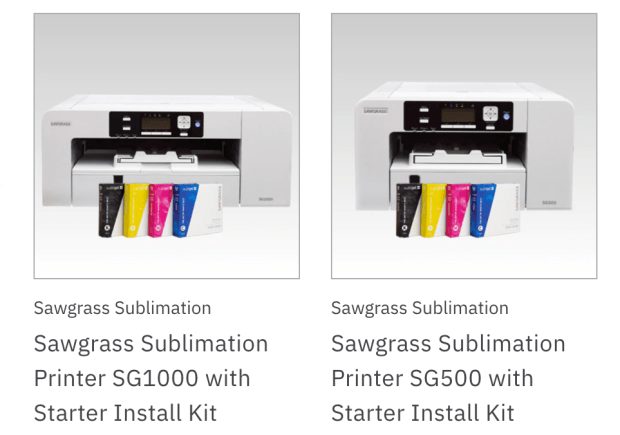
If you’re looking for a sublimation printer, Black Friday is the time to buy. They’ve got tons of Sawgrass bundles that will have you sublimating in no time. I highly recommend their printers. The SG500 is an 8.5 x 14 printer and the SG1000 is their larger model which can print up to 13 x 19. Check out the sales here.

This is my cute heat press you see in many of my videos. I love it so much. I’m not sure if they will have a Black Friday special on it or not, but I highly recommend it. You can check the pricing here.

Did you ask Santa for a Glowforge? If he clicks on this link he can save $100 on a Basic, $250 on a Plus and $500 on the PRO model of the Glowforge!

Are you a sign maker, Cricut crafter, Silhouette Saavy or Glowforge destined, then the next set of deals are for you.

One can never have enough fonts, SVGS and designer files for use with all of our crafty hobbies. Check out this ULTIMATE $1 Event! I always stock up on tons of files to use with my Cricut, Silhouette, Glowforge and Sign paining hobby. You are sure to find 1 or 2 (ahem.. ok, I bought 10) bundles that you need.

Speaking of amazing designer files. Check out these EMBROIDERY files at 90% off. Yes, they are up to 90% off. some of them are $0.29! I mean, we all need more embroidery files, right? The files shown above are just a teeny tiny sample of the 5,500 + embroidery files they have to offer.

While you’re there, check out these SVG, PNG, JPG and font bundles and many more (over 1 million more to be exact!).

They are also offering a Black Friday Special to try their All Access Pass for just $1. It’s a monthly subscription service that gives you Access to all of their files. You can cancel any time. (Join for a month, pay $1 and cancel if you want). You can find out more about that here.

If you’re in the market for Easyweed Heat Transfer Vinyl or Oracle Adhesive Vinyl check out the lowest prices of the year and get free shipping here.

And for my sewing and embroidery enthusiast, check out these Black Friday deals and many more by clicking here.

I hope you find some amazing deals on this Black Friday. This has been one crazy year and I know online shopping is going to be more popular than ever! If you’ve seen some amazing deals, leave a comment below and let me know. I have barely started my shopping this year!

If you’d rather see the deals in video form you can click below.

*Disclaimer:  Some links above are affiliate links.  By clicking on these links I may earn a small commission at no cost to you.   Some products may have been provided to me by vendors.  All opinions and reviews are strictly my own.

Thank you

Holiday Hand Sanitizer Holders

It’s 2020, the year of the Hand Sanitzer. If we have to carry hand sanitzer, it has to be cute and seasonably appropriate, right? I was searching for this week’s embroidery video and stumbled upon these cuties on Designs By Little Bee’s website. I thought they were perfect little somethings for me to give to our delivery people (Amazon Delivery, UPS, MailMan, and my Fed Ex delivery man).

They are just a little something to make their long holiday delivery days a little bit brighter.

I am going to show you how to make the Santa version on the Ricoma EM1010 Muti Needle and the Reindeer on the Single Needle Janome, but don’t worry, you can make either one on either machine. You can even make them with a 4 x 4 hoop (just choose the design with the eyelet).

As a reminder, if you’ve been thinking about the Ricoma EM1010 their Black November specials are still running through the end of November. Use this link and save $100 off their already lowest prices of the seasons, along with FREE shipping, 0% financing and Free Starter kit which includes CHROMA software!

Are you ready to get started? I’ve got both videos linked below. Regardless of which machine you have, you can watch either video to walk you through each step. The difference with the multi needle is that I don’t have to stop to rethread and change colors (much faster).

Here’s the Santa Multi-Needle Tutorial:

Here’s the Single Needle Reindeer Tutorial:

*Disclaimer:  Some links above are affiliate links.  By clicking on these links I may earn a small commission at no cost to you.   Some products may have been provided to me by vendors.  All opinions and reviews are strictly my own.

Let’s Sublimate a Sport Tek Shirt!

My daughter said that Ace is in desparate need of long sleeve shirts. It seems he’s done a bit of growing in the last little bit and all of his long sleeve shirts are leaving him looking a little cold around the wrists! I’m sure those of you with kids and grandkids can relate. They grow so fast!

I went to my box of blanks from Heat Transfer Warehouse and and found two of these really nice SportTek shirts. They are 100% polyester and remind me of the Underarmour shirts my son used to wear under his baseball jerseys. The Sawgrass SG500 and my pretty pink heat press have made it so easy to make customized shirts for the kids. Ace and his dad are hockey fans, so I found this design and within a few minutes, voila Ace has a new long sleeve shirt.

If you want to watch the entire process, of course, I video’d the step by step instructions.

*Disclaimer:  Some links above are affiliate links.  By clicking on these links I may earn a small commission at no cost to you.   Some products may have been provided to me by vendors.  All opinions and reviews are strictly my own.

DreamBox Black Friday Sales Start NOW!

If you ever thought of purchasing a DreamBox, now is the time! Createroom is having their biggest sale ever! The DreamBox will be at it’s LOWEST PRICE EVER now through November 30, 2020.

You can save up to $1000 off the DreamBox with my code and links! That is an incredible savings!

If you pair the DreamBox with the SewStation or DreamCart you will save even more. If you’re already a DreamBox owner, they didn’t forget you, they have special savings like 20% off Accessories, $75 off a DreamBox and/or DreamCart, but you have to use the link and code to cash in on these special savings. Please note US, UK and Canadian Customers all have specific codes and links.

I highly recommend the DreamCart! It’s one of my favorite pieces in my craftroom. It’s mobile, has storage and would be perfect for a home school environment.

The SewStation is another great option. I am considering adding one to my studio.

Here are the codes and a list of the special savings by Country:

US CUSTOMERS:

Canadian Customers:  

  • Use this code LORRIECA700 to save $700 and and use this link. to save.
    • Save $700 + Free Shipping (first 50 orders only)
    • Save $66 on the DreamCart
    • Save $46 on the Side Tables

UK Customers:  

  • Use this link and code LORRIEUK563 and use this link
    • Save 563 Euros and free shipping (1st 100 customers only) 
    • Save 60 Euros on the DreamCart
    • Save 48 Euros on the Side Tables
    • Save on Accessories

If you’d like to see my DreamCart ande DreamBox, watch my video:

The above links are affiliate links. Using these links help support my channel, free tutorials and patterns. Thank you!

How to Sublimate a Glass Cutting Board

Are you looking for gift ideas for the holidays? I’ve got one that I hope you’re going to love!

I am back with another Sublimation tutorial. Today, we are making glass cutting boards. I found these to be so fun. I can think of a ton of ways to utilize this fun project. How about putting your favorite team logo and then using it as a cheese/serving tray at your next football gathering? Photos, of course, make great gifts for grandparents as well as moms and dads. Another fun idea would be to add your favorite family recipe and then give them to various family members. You could also add a favorite quote, holiday meme, favorite characters, movie scenes, inspirational quotes and the list goes on and on. However you choose to use them, I am sure they will be greatly appreciated.

I used my Sawgrass SG500 sublimation printer and my 15 x 15 heat press with the pretreated glass cutting boards that are perfect for sublimation (hint: use code 9PSR5 to save 15% on the cutting boards).

Want to see how easy it is to create this fun addition to any kitchen? Let’s get started:

*Disclaimer:  Some links above are affiliate links.  By clicking on these links I may earn a small commission at no cost to you.   Some products may have been provided to me by vendors.  All opinions and reviews are strictly my own.

Animal Print Key Chains… I mean c’mon :)

I was so happy when Parker on the Porch gave me the OK to make a video featuring her fun animal print key chains. I mean, Leopard is the signature pattern of this crazy 2020 year.

Leopard is everywhere.

They are each made on the embroidery machine. I used my Ricoma EM1010 Multi-Needle Machine (link saves you $100), but you can make them on a single-needle machine as well.

I sent this one to my leopard-loving friend, Teri. She loved leopard before leopard was on every display at the mall.

I kept the Zebra keychain, but I love the tiger print, too! Don’t you think they would make the perfect stocking stuffer?

If you want to learn how to make these adorable In the Hoop Key Chains, click the tutorial below.

*Disclaimer:  Some links above are affiliate links.  By clicking on these links I may earn a small commission at no cost to you.   Some products may have been provided to me by vendors.  All opinions and reviews are strictly my own.

How to Embroider a Beanie

Now this is fun!!

Oh the weather outside is frightful… and my beanie is so delightful. Since we’ve no place to go, let us SEW, let us SEW, let us SEW!

It is official, the summer season has left northern Indiana and the Fall is on it’s way out as well. Winter is around the corner, which means lots of hats, gloves and warmer clothes in my neck of the woods.

Today, I’m going to show you how to create a very easy Embroidered Beanie. I picked up several of these beanies as soon as I received my embroidery machine, however, for some reason I was afraid to give them a try. They are so simple to add embroidery and customize. I used my 8 in 1 Hoop and my Ricoma multi-needle machine (save $100 with this link) to add my logo to this beanie in a matter of minutes!

Want to learn how? Follow my step by step tutorial

*Disclaimer:  Some links above are affiliate links.  By clicking on these links I may earn a small commission at no cost to you.   Some products may have been provided to me by vendors.  All opinions and reviews are strictly my own.

How to add Embroidery to a Stocking

Yes, I know it’s November and yes, I know we still have Thanksgiving to celebrate, but darn it anyway. It’s 2020 and I can hang my stocking if I want to. I don’t know about you, but I am so stinking excited that the Christmas season is right around the corner. I wanted to kickstart the season by embellishing this really cute stocking that I picked up in the Target Bullseye.

I used my Ricoma EM1010 embroidery machine and Chroma Embroidery Software to add my name. I love the vertical direction as opposed to the traditional horizontal direction.

In case you are interested in a multi-needle embroidery machine, Ricoma is currently offering their BLACK November sale. You can get 0% financing, free shipping and special pricing with their current sale. If you are interested and use my link you will also save an additional $100.

Here is the step by step tutorial to create this easy stocking.

Drawstring Pouch

I am back with another beginner-friendly sewing project. This drawstring bag is a great staple pattern to have in your sewing arsenal. It is so versatile.

This pattern can be adapted to any size you need. It is great to be used as a reuseable gift bag, candy bag, gym bag even a mask bag. I keep one in my car to keep clean masks in and another for dirty masks.

Find out how to create this multi-purpose bag in my step by step tutorial here: